Music studio software
Software that knows the family.
Lessons, billing, payroll, repairs and a portal for every family. Built inside a working music studio, around one idea: a family is one account.
It runs a working studio today. Coming soon to yours.
The film
See it in motion.
From the front desk to the family’s phone, in two minutes.
Read the narration
This is B♭ Studio, software we built inside a working music studio. This is the front page. Today’s lessons, lessons nobody has marked yet, and what families owe.
The calendar shows every lesson by teacher and room. Click a lesson to open it, or drag it to another day, and the time stays the same. Bookings are checked as you make them, so a teacher can’t be in two places at once.
Attendance drives the invoice. A month of lessons turns into invoices in one run, and you see the whole run before a single invoice exists. Nothing is issued until you say so. This screen shows who owes what, and how late it is.
Late money is aged by invoice, so the columns add up to the total. Reminders go out in stages, from a courtesy note before the due date to a final notice. Each stage is sent once, and the studio sets the rungs of the ladder.
News goes to the audiences you pick, families, staff or both. A recital date, a closure, a new teacher. It stays readable after it stops being shown.
Families get their own portal. They see their lessons, which ones happened and whether the student attended, and what they owe, so they don’t have to call the front desk to ask.
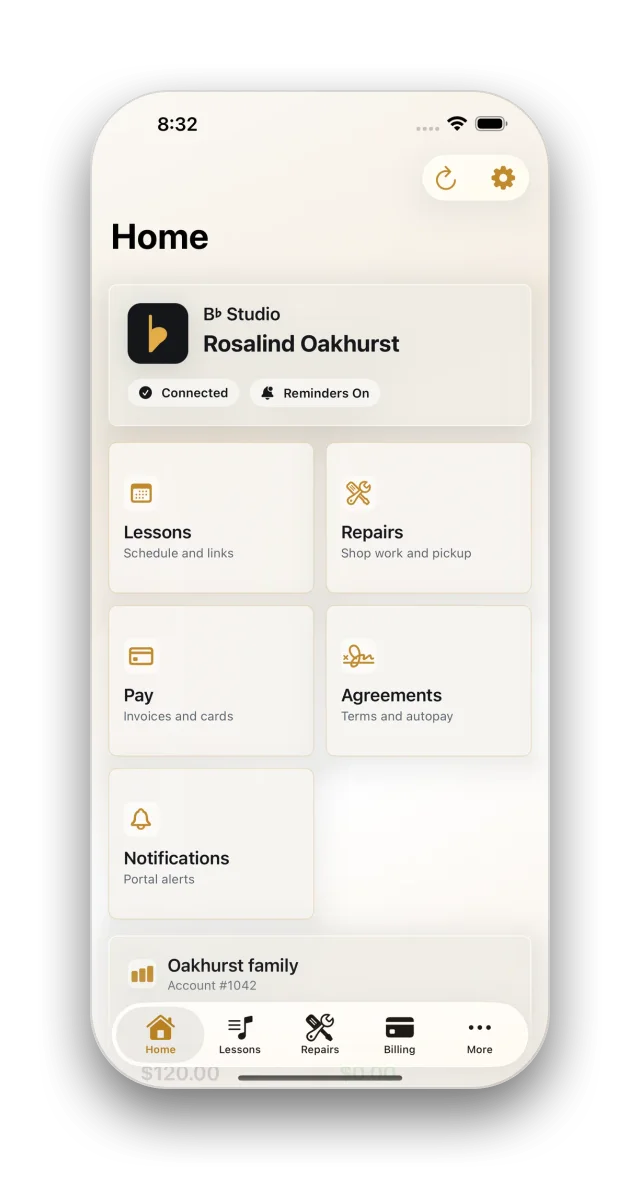
There is an iPhone and iPad app for families too. It reads the same portal, so there is one set of records. It is coming soon.
Your rules are settings. There are more than a hundred and thirty, in two dozen areas, and a family’s billing terms, due day and reminders can each differ from the studio’s. Your name, your logo and your colors are settings too.
B♭ Studio runs one studio today, and it is coming soon to others. Pricing is coming soon too. Join the waitlist at bflatstudio.com.
One account
One family. One account.
Wren takes lessons on Tuesday. Her brother Orrin has Thursdays. Their dad brings a Martin in for a fret dress. To most software that’s three separate things. To B♭ Studio, it’s the Marlows.
Lessons add up through the month and are invoiced on the terms you set. The repair is due when the guitar is picked up, because nobody hands back a Martin against an invoice that isn’t due for three weeks.
Both land on the same account. The front desk sees one balance, one history and one person to call.
Teaching
Mark who came. The invoice follows.
Attendance isn’t a record you keep for its own sake. It’s what the month’s invoice is built from, and what each teacher is paid from.

A teacher can’t be in two places at once, and a room can’t be booked twice. The schedule says no while you’re still booking, not at four fifty-five on the day.
Billing
See the month before it happens.
The billing run shows every account, every line and every skip, with the reason, before a single invoice exists. Then you commit it, or you don’t.
Tax is worked out on each line, not on the subtotal. Rounding the subtotal is how an invoice ends up a cent out every month with nobody able to say why.
Credits and refunds have limits by role. The front desk can clear a small one. A bigger one goes to a manager, a bigger one still goes to the owner, and whoever asked can never be the one who approves.
Late payments
Nobody has to be the bad guy.
A courtesy note before the due date. One on the day. Firmer ones after that, then a last notice and a warning about the late fee.

Each reminder goes out once, on the schedule you set, so the front desk isn’t the one chasing. Money that’s late is counted by invoice, not by account, so the columns always add up to the total.
Families
Families get answers without calling.
A portal on the web and an app for iPhone and iPad, both reading the same records. What’s owed, what’s coming up, who the teacher is, and how to ask for a make-up lesson.

For families
Coming soonPay a balance, and Apple Pay works. See the schedule, ask for a make-up lesson, sign an agreement. Reminders arrive as notifications, and the app locks behind Face ID when it has been closed or left idle. There is no second copy of anything to keep in step.
It’s a practice room too: a metronome, a tuner, scales, chords, ear training, rhythm and sight reading. Families at a studio on B♭ Studio get all of it free. People with no studio can have it as a monthly subscription through the App Store. See the Practice app →
For staff
PlannedFor work done standing up: marking attendance between lessons, photographing an instrument at the bench, and checking whether the family at the counter owes anything before you hand their guitar back.
The family app is built and coming soon. It will be part of every plan. More about the portal →
Trust
Private by design.
A studio holds children’s names, addresses and what a family owes. We built it as if that mattered, because it does.
Card numbers never reach the studio.
They go from the family’s phone straight to the payment processor. The studio keeps a reference and the last few digits, so a family can tell one saved card from another.
An audit trail nobody can edit.
Every change is recorded: who made it, what it was, when. Not even the owner can rewrite it.
A tuner that never records.
It works out the note on the phone and the sound goes nowhere. No ads, and no tracking across other companies’ apps or websites.
Yours
Your studio. Your rules.
Cancellation windows, what counts as chargeable, when a late fee applies, how the Auto-Pay discount works. They’re your terms, written as rules the software enforces. And a family can have its own billing terms, due day and reminders.
- 130+settings that are yours to set
- 24areas they cover
- 31scheduled jobs you can watch
Your logo, colors, currency and time zone are settings too, and none of it is custom work. The scheduled jobs that chase invoices, expire make-ups and send statements each show what they last did and what they will change next, and each has a Run now button.
And the rest
Everything else a studio runs on.
Payroll, repairs, reports, online lessons. Each is part of the same system, not something bolted on from somewhere else.
Lessons
A teacher cannot be booked into two rooms at once.
Scheduling, attendance and make-up credits, feeding straight into the invoice.
SchedulingAttendanceMake-upsTeachersRoomsMaterialsBilling
You see what a billing run will do before it does it.
One account per family, monthly runs you preview first, and credits with limits by role.
InvoicingBilling runsProrationTaxCreditsPaymentsStatementsRepairs
An instrument doesn’t leave with an unpaid invoice.
Intake to pickup on one board, invoiced and payable at the counter.
Work ordersQuotesParts & laborPickupPayment gatePayroll
A raise in October doesn’t change what September paid.
Teacher pay from attendance, at the rate that applied on the day taught.
HoursPaystubsApprovalsPayout setupContractor payoutsReports
Who is behind on payments, and who has stopped coming.
Four questions answered on screen, as a file, or in your inbox on a schedule.
RevenueReceivablesTeacher hoursAttendanceCSV & PDFFamily portal
Families can check what they owe without asking the front desk.
Families see their own invoices, lessons, balance and repairs, and can pay without calling the desk.
InvoicesLessonsStatementSaved cardsPay onlineMake-ups
Planned next
Production
PlannedStudio sessions and deliverables, with a deposit up front and the balance on delivery.
One job with two payments: a deposit and a final balance.
Where it came from
Built inside a working studio.
We wrote B♭ Studio to run our own music studio, and it still does. Everything in it earned its place at a real front desk, which is why it answers questions a studio actually asks: who owes what, who didn’t show, who got paid for which lesson.
Be the first to know.
B♭ Studio is coming soon. If you run a studio, join the waitlist and we’ll tell you the moment there’s something to show you.
Join the waitlist